
原生的本地缓存方法api调用,有一定限制和麻烦的地方
为了达到效果
参考:web-storage-cache的github库
[toc]
例子🌰
myStorage = new xxx()

myStorage.set('key','value',{exp:100})  // key value(字符串/对象) 超时时间设置(单位秒/日期字符串/date类型)
myStorage.get('key')  // 自动把字符串转为对象
myStorage.delete('key')
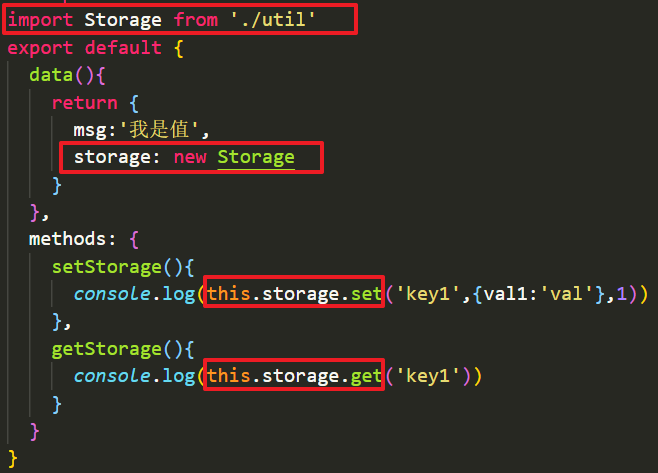
set()方法
实现步骤:
- key格式判断(字符串、数字转换)
- 时间参数,数字补成
{ time: 数字 } - 构建实际存入本地缓存的
对象- 当前时间戳
- 结束时间戳(三种情况生成)
- 实际值(对象转字符串)
- 用
try catch来存入本地缓存localStorage
实现代码:
set(key, value,options) {
    // 判断key值,判断val值,判断时间值
    key = _checkKey(key)
    // 判断options入参,不是对象的话,转换为对象
    if (typeof options === 'number') {
      options = {
        time: options
      }
    }
    const obj = {
      val: _serialize(value),
      nowTimeNum: (new Date()).getTime(), // 当前时间戳
      endTimeNum: _getEndDateByOption(options.time).getTime()
    }
    try {
      this.storage.setItem(key, _serialize(obj))
    } catch (err) {
      console.log('存入本地缓存失败',err)
    }
    return _serialize(value)
  }
👆过期时间要转换为具体时间戳(传入过期时间有3种情况)
// timer三种情况:数字类型(秒为单位),字符串类型(日期格式),date对象类型
function _getEndDateByOption(timer, now) {
  now = now || new Date()
  // time是数字(秒为单位)或者日期字符串的情况
  if (typeof timer === 'number') {
    timer = new Date(now.getTime() + timer * 1000)
  } else if (typeof timer === 'string') {
    timer = new Date(timer) // 字符串结束日期,可能设置错误,写了比当前时间早(要做处理吗?)
  }

  // time是Date对象的情况
  if (timer && !_isDateObj(timer)) {
    throw new Error('`timer` parameter cannot be converted to a valid Date instance')
  }
  return timer
}
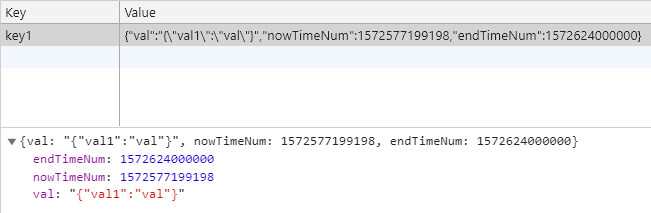
最终存入的数据格式
get()方法
实现步骤:
- key格式判断(字符串、数字转换)
- 用
try catch来取本地缓存localStorage- 判断是普通本地缓存数据(这条数据里没有
同时存在过期时间实际值当前时间) - 有结束时间,判断是否过期:
- 过期:删除本条数据,并返回
null - 未过期:返回数据中的实际值(
字符串转对象)
- 过期:删除本条数据,并返回
- 判断是普通本地缓存数据(这条数据里没有
实现代码:
  get(key) {
    key = _checkKey(key)
    let obj = null
    try {
      obj = _deserialize(this.storage.getItem(key))
    } catch (err) {
      console.log('获取本地缓存失败',err)
      return null
    }
    // 判断本地缓存数据里是否有结束时间
    if (_checkObj(obj)) {
      if (!_isTimeOut(obj)) return _deserialize(obj.val)
      else {
        this.delete(key)
        return null
      }
    }
    // 获取普通本地缓存数据(没有设置过期时间)
    return obj
  },
👆判断本地缓存对象(存入时,一定被转为对象了)是否同时有结束时间等
// 判断本地缓存数据里是否有结束时间(内含 c-当前时间戳 b-超时时间戳  v-内存值)
function _checkObj(item) {
  if (typeof item !== 'object') {
    return false;
  }
  if (item) {
    if ('nowTimeNum' in item && 'endTimeNum' in item && 'val' in item) {
      return true;
    }
  }
  return false;
}
其他
封装成构造函数只是为了能用this.storage这个值(localStorage对象)
实际上不需要封装成构造函数,this.storage这个值没必要抽出来...
最终暴露出 { get(), set() }这种形式用好像更方便
最终代码:
github